

The Bad
Oura’s iconic smart ring is now on its fourth generation, and the improvements over the Oura Ring 3 are subtle. They do add up enough to make it worth the upgrade if you’re already bought into the concept, but don’t push the envelope or overcome core weaknesses that are still an issue a decade in.
I have some strong opinions about the Oura Ring—I use it in real life, not just for reviews, and I’ve used three of the four generations of the ring. (I joined the bandwagon too late for gen 1.) I think it’s great for sleep tracking and for keeping tabs on recovery metrics like HRV, but I’m still disappointed in its attempts to track workouts and I don’t find its other features particularly useful. If you want to track everything in your life with wearables, you’d want a watch to wear for workouts in addition to your Oura ring for night time. But that’s a big ask when you need to pay a $5.99/month subscription fee for even Oura’s most basic features.
I first reviewed the Oura Ring 4 in March of 2025, and I’m updating the review for 2026 in light of a few developments. One is the charging case, a $99 add-on that improves its usability in everyday life. (You will want to take the ring off for some workouts, and it’s handy to have the case in your gym bag.) Another is simply the fact that I’ve tried more smart rings, like those from Ultrahuman, Luna, and RingConn. (Some of those reviews are forthcoming.) Oura really is the best of the bunch.
For those reasons, I’m bumping up my rating from a 4.0 to a 4.5. That said, while Oura is better than other smart rings out there, it’s significantly more expensive. The price range is higher (premium finishes cost $499), the charging case is $99 instead of being included with purchase, and then there’s the subscription fee on top. That’s a lot of change to drop on something that can’t track all your activities.
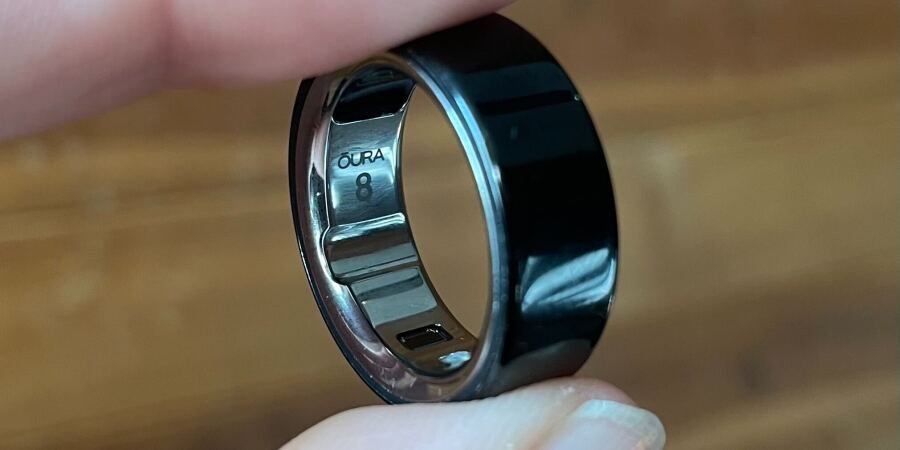
Put on the gen 4 Oura ring, and the first thing you’ll notice is that it’s smooth inside and out. That’s in contrast to earlier generations, which had sensor bumps on the inside, and came in different exterior shapes. (The flat-topped Heritage was one of two shapes available in gen 3, and there was the single-pointed Oura Ring Balance way back in gen 2).
The rings I’ve tried from Ultrahuman, Luna, and RingConn all have some kind of sensor bump or thickened flat area inside the ring. Oura is the most “ring-like” of the bunch, compared to a traditional jewelry ring. The current model just as a small indent at the bottom of the ring, which is not normally visible to observers but offers a nice tactile hint if you’re a person who likes to fidget with your ring.

But as with previous generations, the Oura ring is chunkier than almost any ring you’re likely to wear as jewelry, which is admittedly true of other smart ring brands, too. For comfort’s sake, that means you’ll want to take the Oura ring off when you lift weights, or do work with your hands like shoveling snow or paddling a kayak. I’ll get into how that limits its activity tracking later, but for everyday use, the ring is comfortable once you get used to it.

Oura recommends wearing the ring on your index finger for best results, but I tried that and couldn’t stand it—I was constantly getting it caught on things. I tested this ring on my middle finger. Don’t tell Oura, but I normally wear my gen 3 on my ring finger and get perfectly good data.
Before you buy an Oura ring, you’ll need to know what size you are. Unlike watches that can take adjustable straps, the Oura ring comes in twelve different sizes (4 through 15, no half sizes) and you need to order the correct one.
There are two ways to find out your size. The best way is to buy a sizing kit, which costs $10 but comes with a $10 discount that you can use on your ring when you buy it. The quicker way is to visit a store that has in-store sizing rings. Best Buy has them, tethered to a display on a shelf, and you can try on the rings while you stand there.

The take-home sizing kit contains plastic rings that are the same size and shape as their smart ring counterparts, so you can slide on your preferred size and wear it all day, including to bed. It’s normal for fingers to swell slightly with exercise, weather, and even sleep, so this will give you a better idea of your size than a quick in-store try on. If you can find a size that fits one of your fingers snugly and another loosely, that would be ideal.
Note that gen 4 sizing is not the same as the sizing on the older gen 3 rings, so if you’re buying a sizing kit, make sure it’s for the correct generation of rings. (I have some thoughts here on how to choose a size if you’re upgrading from a gen 3 to a gen 4.) These ring sizes will be similar to the sizes on jewelry rings, but you really do have to try them on to be sure you know your size.

With sizing and comfort taken care of, let’s get into what sets the Oura apart from jewelry. Long story short: if you love getting data about your sleep and what that may mean for your health and energy levels, you’ll love this ring. Taking measurements quietly in the dead of night is what the Oura ring has always excelled at, and everything else is just icing on the cake as far as I’m concerned.
I will never trust any wearable to tell me for sure how long I spent in each sleep stage, but when it comes to things I can check, like how long I was awake during the night, Oura’s results make more sense to me than results from other wearables. You’ll get statistics on how long you slept, how long it took you to fall asleep, and whether the timing of last night’s sleep (how late or how early) was consistent with your usual schedule.
You’ll also get your HRV and resting heart rate right at the top of the Readiness screen on the Oura app, and these are the numbers I find most interesting. Oura’s readings on these numbers are in line with the other devices I’ve tested (here’s my five-way comparison with Whoop, Apple Watch, and others) but it does seem to give a slightly lower resting heart rate than other devices. What you’re really looking for is a trend, though, so the absolutes don’t matter, just whether the number is going up or down. And I’ve found the trends from the Oura ring to be more useful to me over time.

In addition to HRV, heart rate, and sleep time, the ring also records your body temperature. Rather than relying on the temperature itself, the ring reports this in terms of deviations from your baseline, as well as your respiratory rate, which can provide a few extra insights. Some people find that the temperature readings can tell them when they’re getting sick, but that’s never worked for me. By the time Oura picks up on a problem, I’ve known I’m sick for days.
The app also interprets your data to give higher level insights, which are hard to check for accuracy but which you may find useful. For example, the Oura ring also tracks your “stress” during the day (from your heart rate, not your emotional state) and from this it can calculate your “resilience”—are you recovering well from the stress you’re under? You’ll also be notified of your ideal bedtime (mine is between 10:45 to 11:45 p.m.) and another feature calculates your “cardiovascular age” determined, in part, from a six-minute walking test.
The temperature feature can be worthwhile for another bodily function: if you have a monthly cycle, your temperature ticks up around the time of ovulation, which the Oura ring can detect. This tells you when you’re in your luteal versus follicular phases, and can help you to narrow down when you’re most likely to get pregnant. Oura has a partnership with fertility/birth control app Natural Cycles so that you can use your Oura data to track your cycle and try to get pregnant or avoid pregnancy.
Unfortunately for people who don’t get a regular period, the app requires you to log your period for it to be able to look for those monthly temperature fluctuations. So if you’re wondering whether you even have a monthly cycle—say, you don’t have a period because you use an IUD that inhibits ovulation in some but not all users—this wearable won’t necessarily help you figure it out.
The fluctuations in temperature and HRV that can occur throughout your cycle may also affect your readiness score. Oura takes that data into account, although you need to turn on the cycle tracking features for it to be able to make those adjustments.

Now that we’ve talked about what the Oura ring is good at tracking, we come to the stuff that it’s not so good at. Since the ring can monitor your heart rate, and since everybody wants to keep tabs on their calories and steps and heart rate zones these days, Oura has this functionality in its device. But it doesn’t work well, and I would not recommend using an Oura ring as your main fitness tracker. To give a rundown of the issues:
You can’t easily start and stop an activity, and instead have to wait for the ring to auto-detect it. It’s reasonably good at this, for things like telling whether you went for a walk, but it’s not nearly precise enough to track a workout where you might care about exact length.
There is a feature that is supposed to let you start or stop an activity from the app, but I found it unreliable.
The ring doesn’t have GPS capabilities, so it uses your phone’s location tracking for walks and runs. That’s not usually a very accurate option, although that depends on your phone.
Heart rate tracking requires location tracking to be turned on, for some reason.
Heart rate zones are based on the one-size-fits-all formula of 220 minus your age, which is wrong for many people. That said, Oura did update the app in 2025 with the ability to enter a custom max heart rate. (You can find it under Settings and then Activity.)
Personally, I ignore any workout data the Oura Ring 4 collects when I run, and I take the ring off when I lift. It’s gotten to the point where I now put my ring on its charger when I leave for the gym. Fortunately, the Oura app does a good job of importing workouts from other apps, so I can track a run on my Garmin and Oura will note that I ran three miles that day and credit that towards my activity score.
There are basically two viable approaches to activity tracking that I see for Oura users. One is for people who don’t care to track their activities in detail. If your ring picks up on your daily walk or jog, cool. It’s in there. You have a record of whether you were active that day, and a rough sense of how active. If that’s all you care to track, great.
The other is for people who are serious enough about exercise that they already have another device, like an Apple Watch or a Garmin, to wear while they work out. Obviously, this requires buying two devices. So you wear the Garmin to the gym, and the Oura ring to bed. Need to dress up for an event? Wear your ring to keep tracking your steps and stress, and leave your sports watch at home. This is a perfectly workable option, but most of those sports watches—including Apple Watches and pretty much every Garmin—already track the same data as an Oura ring. So you could skip the ring entirely if you’re comfortable wearing a watch to bed.

The Oura ring’s charger is one of the more annoying aspects of living with this ring. The charger that comes with your ring is the only one you’ll be using, unless you buy an identical replacement for $59.99. Note that the charger is sized to your ring, so a size 8 ring needs a size 8 charger.
There’s been some great news since the ring first came out: in January 2026, Oura started selling a charging case that can charge your ring without attaching anything to a USB cable—like how AirPods charge from their case. It stores enough power for five full charges of the ring. This way, you can take the ring off and charge it without having to set it on the nightstand charger. Carry it in your gym bag, or bring it with you when traveling—no need to plug the ring into any kind of cord. Like the regular charger, the charging case is sized to the ring. It is not included with the ring, and costs $99.

Battery life is great, though. With blood oxygen sensing turned on (a battery-sucking feature), the ring took five days to get down to 21%, at which point I charged it to be sure I’d have enough juice to make it through the next night. With that feature turned off, it took 6.5 days to get down to 19%. Oura says that the ring lasts “up to eight days” on a charge, but that would really mean six or seven days between charges if you charge the ring around 20% when prompted. Oura confirmed in an email that larger sizes of ring have slightly larger batteries, so ring size may also be a factor in battery life. My tests were with a size 8 ring. Still, in general, I appreciate the good battery life, especially since it doesn’t make sense to charge the ring overnight if you want to enjoy the sleep tracking.

If subpar activity tracking is the biggest caveat for the Oura Ring, the pricing model is the next thing to give me pause. The fourth generation Oura ring is $349 for shiny black or silver, $399 for matte black or brushed silver, and $499 for gold or rose gold. Fair enough. But that’s not all—you’ll need a $5.99/month subscription to properly use the ring.
Without the subscription, you won’t get detailed data in the app, like your heart rate variability (HRV), your resting heart rate, or the breakdown of your sleep stages or even how long you were asleep. All the data that the ring is actually collecting will be hidden, and you’ll just get three scores: one number each for your readiness, sleep, and activity. That makes the app pretty much useless—what does it even mean that my readiness today is “75”? Even without a subscription, you can still download your data from this web dashboard, but that’s a major hassle.
Oura briefly offered a lifetime subscription, and grandfathered in some long-time customers including myself, but if you’re buying a new Oura ring today, your options are $5.99/month or $69.99/year. Your first month is free.
Also important to consider: how long will your $349+ ring last? My gen 2 and gen 3 rings both lasted about two years before their batteries were so degraded they could only hold a charge for a day or two. We don’t yet know how long the gen 4’s battery will last, but it’s very possible you’ll be shopping for a new ring in a few years’ time.
The Oura ring is excellent at tracking biometric data while you sleep, and is a great device for keeping track of metrics like your HRV, resting heart rate, and how much and how well you’re sleeping. You may like that it can do all this without a screen or a wristband, and if you’re OK with the subscription fees, then this is a great health tracker for you.
It is not, however, much good as an activity tracker. If your fitness concerns go much beyond “did I get my steps in?” you’ll probably want a second device like an Apple Watch or Garmin to track your exercise—at which point you might as well just use that device to measure the things the Oura ring can do.
I would recommend the Oura ring for someone who wants to track their sleep and overall health without wearing a watch, or for someone who wants to keep tabs on their ovulatory cycle without taking their temperature manually every morning. Heck, I find mine convenient enough I still wear it every night even though I have at least one watch on at all times (the life of a fitness tech reviewer). Just be sure that you know what you are and aren’t getting out of it—and that you’re OK with the $5.99/month subscription fee.
Oura recommends using the index finger, but that’s not required. I did an experiment to compare my readings on different fingers, and found that the index and middle fingers were equivalent for me. An Oura representative told me: “We suggest avoiding fingers with large knuckles where the base is significantly narrower, which can affect fit and sensor contact. This is why we generally recommend the index finger. If that’s not comfortable or preferred, the middle or ring finger are also good alternatives. All three fingers have larger blood vessels, which help optimize PPG pulse monitoring.”
Readings (like resting heart rate and HRV) seem to be pretty accurate. Scores, like “readiness,” inherently can’t be tested—they come from an app running some calculations according to its own formula. If you want to get serious about your data, look at the measurements and not the calculated scores.
I did a comparison of the two here. The gen 4 is a better ring, more accurate, and more comfortable. But to be honest, the gen 3 ring is still pretty good. During sale events, the price of the gen 3 can sometimes drop close to $200, as we saw last Black Friday. If you can get a good deal on the 3, I’d take it.